Scheduler
This page describes the dAIEdge-VLab scheduler and how it works.
The following diagram illustrates the overall architecture of the dAIEdge-VLab and the schedluler component within it. This is a conceptual heigh-level overview and does not fully represent the actual implementation details.
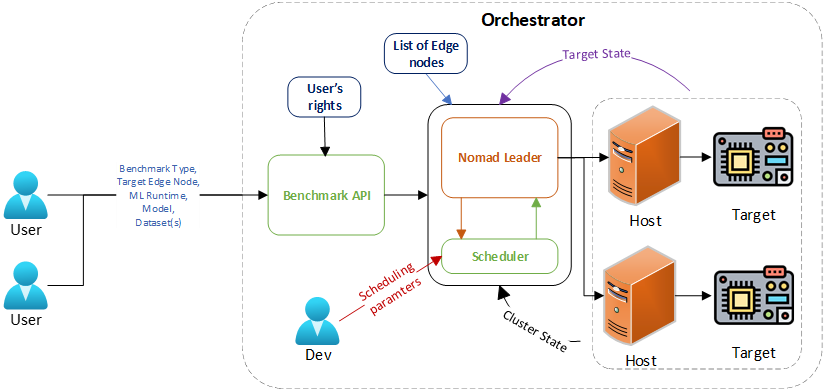
Scheduler overview
The dAIEdge-VLab Scheduler is a part of the dAIEdge-VLab benchmark API. Conceptually, they are two separate components, but as of now they are implemented in the same codebase. The main reason is that the scheduler is currently fairly simple and closely linked to the API. In the future, if the scheduler becomes more complex, it could be split into a separate service.
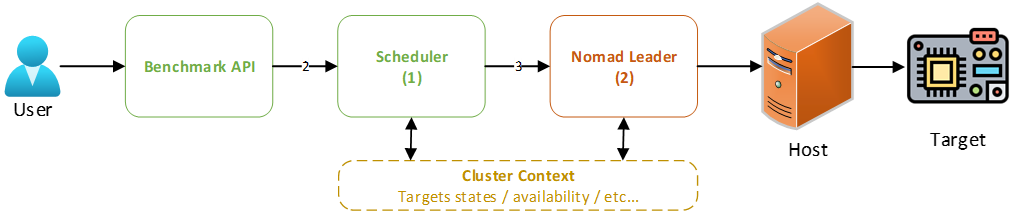
Two step orchestration pipeline :
- The scheduler receives a request from the user via the dAIEdge-VLab API. The request contains all the information needed to run a benchmark, such as the model, dataset, target device, and runtime environment, and user specific constraints (e.g., user’s priority, budget, time, etc.).
- The scheduler processes the request and selects the most appropriate target device based on the provided information and determines the optimal time to run the benchmark. It then creates a Nomad job with the necessary specifications and submits it to the Nomad cluster for execution.
Job descriptions :
- The first job description is the one provided by the Benchmark API. It aggregates all the information needed to run a benchmark and the user specific constraints (arrow 2 in the diagram). This job description is referred to as the pre-scheduler job description.
- The second job description is the one created by the scheduler. It is a Nomad job description that contains all the information needed to run the benchmark on the selected target device (arrow 3 in the diagram). This job description is referred to as the Nomad job description.
Pre-scheduler job description
The pre-scheduler job description is an object that contains the following fields :
- Benchmark information :
benchmark_id: The unique identifier of the benchmark.model: Model namemodel_url: The URL to download the model.runtime: The runtime environment to be used for the benchmark.benchmark_type: The type of benchmark to be run. (TYPE1, TYPE2, etc.)dataset: The dataset name to use for the TYPE2 benchmark. (optional)dataset_urls: The list of URL(s) to download the dataset(s). (optional) (used for TYPE2 and TYPE3)odt_config: Configuration file for the on-device training. (optional) (used for TYPE3)
- Hardware information :
target: The targeted device familly to run the benchmark on.ram: The minimum amount of RAM required for the benchmark. (this is used to filter out devices that do not have enough RAM)storage: The minimum storage required for the benchmark. (this is used to filter out devices that do not have enough storage)
- User information :
user_id: The unique identifier of the useruser_priority: The priority of the user.user_budget: The budget of the user.user_time: The time constraint of the user.
- Scheduling information :
submit_time: The time the benchmark was submitted.deadline: The deadline to complete the benchmark.max_retries: The maximum number of retries in case of failure.
Nomad job description
The Nomad job description is a HCL file that contains all the information needed to run the benchmark on the selected target device. It is created by the scheduler based on the pre-scheduler job description. The Nomad job can only contain information that is supported by Nomad and the edgedevice pulgin (custom plugin developped for allowing edge device capabilites identification and status aggregation).
- Why HCL and not a Json ? Nomad uses HCL (HashiCorp Configuration Language) for its job specifications. HCL is a human-readable configuration language that is easy to write and understand. This job description is then translated into JSON by the Nomad CLI or API before being submitted to the Nomad server.
The nomad job description can specify the following constraints :
- The hardware requirements :
target: The targeted device familly to run the benchmark on.runtime: The runtime environment to be used for the benchmark.benchmark_type: The type of benchmark to be run. (TYPE1, TYPE2, etc.)ram: The minimum amount of RAM required for the benchmark. (this is used to filter out devices that do not have enough RAM)storage: The minimum storage required for the benchmark. (this is used to filter out devices that do not have enough storage)target_uid: The unique identifier of the target device. (This enforces the benchmark to run on a specific device)
- The scheduling requirements :
priority: The priority of the job. (computed by the scheduler based on the user priority and other factors)start_time: The time the job should start. (can be immediate or scheduled for later, can be periodic)max_retries: The maximum number of retries in case of failure.preemptible: Whether the job can be preempted by a higher priority job.job_completion_threshold: Whether the job can preempt a lower priority job that is under a certain completion threshold.
- The benchmark parameters :
nb_inference: The number of inferences to run for the benchmark. (for TYPE1)dataset_filename: The name of the dataset file. (for TYPE2)odt_config_filename: The name of the on-device training configuration file. (for TYPE3)results_pub_url: The URL to upload the results of the benchmark.
- Any other constraints supported by Nomad and the edgedevice plugin.
Now it appears clear that the Nomad job description can be very loosely constrained (e.g., only target familly, runtime, benchmark_type) or very tightly constrained (e.g., specific device UID, start time, etc.) depending on the scheduler algorithm. For loosely constrained jobs, the Nomad orchestrator has more freedom to select the best target device and time to run the benchmark. For tightly constrained jobs, the nomad orchestrator has less freedom. This allows to have a trade-off between flexibility and control, depending on the scheduler algorithm implemented.
One fair question is :
- Can the scheduler make aware decisions based on the current load of the devices and the cluster ?
Short answer is yes : the scheduler can access the Nomad API and query the status of the devices in the cluster ( more generally it has access to the cluster context ). It can then use this information to make more informed decisions when selecting a target device and scheduling the job. For example, if a device is currently busy running a benchmark, the scheduler can choose to schedule the job on another device that is idle. This allows to optimize the resource utilization of the cluster and reduce the waiting time for the user. Furthermore, the scheduler can also take into account the historical performance of the devices and the benchmarks to make more informed decisions. For example, if a device has a history of failing benchmarks, the scheduler can choose to avoid scheduling jobs on that device. It can also take into account the average time taken to complete a benchmark on a device to estimate the completion time of the job and schedule it accordingly. Finally, the scheduler can also kick off jobs on devices that are currently running without letting the Nomad orchestrator to make the preemption decision.
Real example of a Nomad job description generated by the scheduler :
job "benchmark-rpi4b-ort-20250813091714" {

  # Computed priority, Scheduler decision
  priority = 80

  # Cluster and type of job (never change)
  datacenters = ["dc1"]
  type        = "batch"

  # Planed execution time
  # Can be immediate if this constraint is removed
  # or scheduled for later with a cron syntax
  # Scheduler decision
  periodic {
    crons             = ["30 17 7 13 8 * 2025"] # sec min hour day month dow year
    prohibit_overlap  = true
    enabled           = true
  }

  group "bootstrap-group" {
    # Only one instance of the job (benchmark job usually only need one instance)
    count = 1

    task "bootstrap-job" {
      driver = "docker"

      # Artifacts to download before starting the job
      # Download model from the API server
      artifact {
        source      = "http://10.200.0.1:42777/download/small_model.onnx"
        destination = "local/"
      }

      # Image docker to run the job (common to all benchmarks)
      # The plugin selects the final image based on the target device
      # The image name and access rights never leaves the Host side
      config {
        image = "daiedge-vlab-bootstrap"
        network_mode = "host"
        auth {
            username = "******"
            password = "******"
        }
        privileged = true
      }

      # Setting environment variables for the job execution.
      # Follows the convention for the target repository.
      env {
        NOMAD_ALLOC_ID   = "${NOMAD_ALLOC_ID}"
        NOMAD_NODE_ID   = "${node.unique.id}"
        TARGET  = "rpi4b"
        RUNTIME = "ort"
        VERSION_TAG = ""
        NB_INFERENCE = 20
        BENCHMARK_TYPE = "TYPE1"
        MODEL_FILENAME = "small_model.onnx"
        DATASET_FILENAME = ""
        ODT_CONFIG_FILENAME = ""
        RESULTS_PUB_URL = "http://10.200.0.1:42777/upload/rpi4b-ort-20250813091714/"
      }

      # Resource allocation for the job
      resources {
          device "daiedge/edgedevice" { #  Identify the device plugin
          count = 1                     #  how many boards the task needs, normally 1

          # Pick the board-family
          constraint {
            attribute = "${device.attr.family}"
            operator  = "="
            value     = "rpi4b"         # user input variable
          }

          # Pick the runtime engine
          constraint {
            attribute = "${device.attr.engines}"    # = family: rpi5, rpi4b, jetsonorinnano…
            operator  = "set_contains"
            value     = "ort"          # user input variable
          }

          # Pick the benchmark type
          constraint {
            attribute = "${device.attr.engine.ort.supported_types}"    # = family: rpi5, rpi4b, jetsonorinnano…
            operator  = "set_contains"
            value     = "TYPE1"          # user input variable
          }

          # Ensure the device is not busy (benchmark already running)
          # Will only preempt the running job if the benchmark is not close to finishing
          # Only if the job has a higher priority
          constraint {
            attribute = "${device.attr.dynamic.progress}"
            operator	= "<"
            value		  = "90"          # Scheduler decision
          }

          # Ensure the device has enough resources (RAM, storage, etc.)
          # 4GB RAM
          constraint {
            attribute = "${device.attr.memory.ram}"
            operator	= ">="
            value		  = "4294967296"   # User input variable or scheduler decision
          }

          # 16GB storage
          constraint {
            attribute = "${device.attr.memory.storage}"
            operator	= ">="
            value		  = "17179869184" # User input variable or scheduler decision
          }
        }
      }
    }
  }
}
How to leave no room for interpretation by the Nomad orchestrator and the edgedevice plugin ? By specifying very strict constraints, for example :
# Priority of the job (0-100) - keep the same for all jobs if you want FIFO
# Same proprity will prevent the preemption of running jobs from the Nomad orchestrator
# (Preemption can still be enforced by the scheduler itself)
# (Preemption capability can be disabled for the Nomad orchestrator)
# Scheduler decision
priority = 100

# Planed execution time
# Strict job scheduling
# Can be immediate if this constraint is removed
# Scheduler decision
periodic {
  crons             = ["30 17 7 13 8 * 2025"] # sec min hour day month dow year
  prohibit_overlap  = true
  enabled           = true
}

# Pick the exact board to run the benchmark on
constraint {
  attribute = "${device.attr.target_uid}"
  operator  = "="
  value     = "rpi4b-0001-0001"     # Scheduler decision
}
With very strict constraints, the Nomad orchestrator has no choice but to run the job on the specified device at the specified time. This enables to have a very high level of control over the job execution. However, it also means that if the specified device is not available (e.g., offline, busy, etc.), the job will not be executed. Therfore the scheduler must be able to handle such situations and either reschedule the job or notify the user.
Cluster Context
The cluster context is an important aspect to design the scheduler algorithm. The cluster is composed of a set of hosts each containing their set of edge devices that are registered to the Nomad orchestrator via the edgedevice plugin. Each device has a set of attributes that describe its capabilities and status (dynamic attributes). The scheduler can use these attributes to make informed decisions when selecting a target device and scheduling the job. Furthermore, the cluster can be dynamic, with devices being added or removed at any time. The scheduler must be able to handle such situations and adapt its scheduling algorithm accordingly.
The cluster context also includes the list of expected devives (including offline devices). This information can be used by the scheduler to avoid scheduling jobs on unknown devices. An unknown device is a device that is not registered to the blockain and therfore not expected to be part of the cluster. The scheduler can use this information to avoid scheduling jobs on unknown devices and therefore avoid potential failures. This is a mechanism part of the trustworthiness of the dAIEdge-VLab (not deployed yet).
Nomad API
The nomad API can be queried to get the full list of nodes in the cluster with their attributes and associated resources. This information can be used by the scheduler to make informed decisions when selecting a target device and scheduling the job. The following endpoint can be used to get the list of devices in the cluster :
nomad operator api -X GET "/v1/nodes?resources=true"Here is an example for the output of this command :
To get only the resources part of the output, you can use the following command :
nomad operator api -X GET "/v1/nodes?resources=true" | jq '[ .[] as $n
       | (($n.NodeResources // {}).Devices // [])
       | {id:$n.ID, name:$n.Name, devices:.} ]'
Here is an example of the output of this command :
List of edge nodes
The list of edge nodes is stored in a JSON file that is currently hardcoded in the scheduler. This file contains the list of expected devices in the cluster with their static attributes. The scheduler can use this information to avoid scheduling jobs on unknown devices. In the future this list will be provided by the blockchain. The following is an example of the list of edge nodes file :
This file is subject to change with the integration of the blockchain for user management.
Scheduling algorithm
Currently, the scheduling algorithm is very simple. It heavily relies on the Nomad orchestrator to do most of the work. The scheduler only does the following :
- Receives the pre-scheduler job description from the Benchmark API.
- Computes the job priority based on its type (e.g., TYPE1, TYPE2, etc.) and the user priority.
- Creates the Nomad job description with only the necessary constraints (target familly, runtime, benchmark_type) and the computed priority.
- Adds to the job description all the parameters needed to run the benchmark (model URL, dataset URL, number of inferences, etc.).
- Submits the Nomad job to the Nomad cluster for execution.
- Monitors the job status and updates the Benchmark API with the job status (pending, running, completed, failed, etc.). It dosen’t do any rescheduling or advanced handling of failed jobs yet.
The Benchmark API is responsible for serving the different files needed to run the benchmark (model, dataset, on-device training config, etc.) and for receiving the results of the benchmark.